Bring production planning, recipes, inventory, quality and food-safety records and reporting into one browser-based workspace. Give the office a shared view of the work happening across the plant.
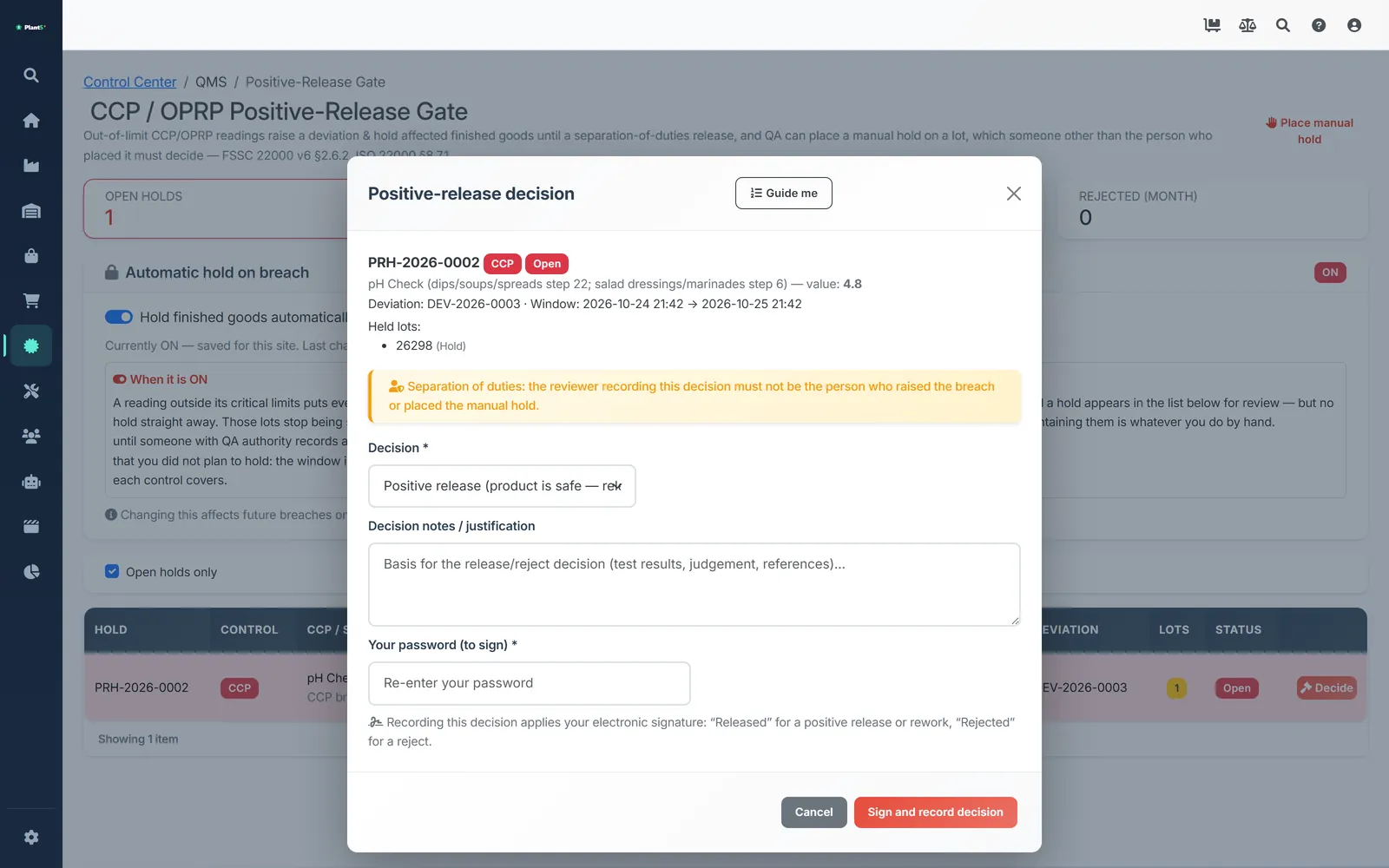
The positive-release gate: with auto-hold switched on, an out-of-limit CCP reading holds the lot until someone other than the person who raised it signs the decision with their password. Demonstration data; configuration and appearance may vary.
Plan production
Plan from the orders you have. Control Center works from open sales orders on a capacity calendar and shows what a plan needs before anyone starts weighing.
Shortfall analysis against stock on hand and open purchase orders, with a procurement preview grouped by supplier.
Create the production jobs and one purchase order per supplier in a single step.
Recipe version control: changing a product-affecting setting such as batch size, tolerance, GTIN, label set or final QC saves a new version while open jobs keep the one they started on, and a save made from an out-of-date copy is refused.
Recipe costing and what-if costing; a produced-lot costing sweep, run on demand or on a schedule you set, costs each lot from what it consumed.
A visual process-route designer for steps, rules, equipment and ingredients, with versioned, e-signed approval and a comparison against the approved version.
Keep quality close to operations
Quality records sit on the same data as production, so a failed check reaches the lot it affects.
Positive release: held lots wait for an e-signed release decision, and a hold raised from a deviation or placed by hand must be released by a different person. A CCP breach or a failed thermal run raises a deviation and a hold record; switch on auto-hold to freeze the affected lots.
Thermal process control: cook and cool readings against the batch, with pass/fail and lethality calculated by the server and a second-person verification.
HACCP plans with versions, a hazard library, and CCP monitoring and verification.
Certificates of Analysis: lab results per lot with pass/fail per analyte, and customer CoAs generated from a sales order.
Label control: artwork approval with e-signature after the allergen and regulatory checks are completed, line label verification and print-run reconciliation.
A standards workspace for FSSC 22000 v6, BRCGS Food Issue 9, SQF Edition 9, IFS Food v8, BRCGS Gluten-Free and Organic, each loaded as a section-and-key-clause checklist you map your records to. Evidence mapped once is reused across standards.
A compliance readiness score with a prioritised action plan, and a daily food-safety review that keeps the risk register current — both included, no AI add-on needed.
More than 30 registers with PDF output, from glass and pest control to environmental monitoring, food fraud, food defence, internal audits and management review.
“Guide me” walks a user through every required field on a form.
Follow the full picture
Review inventory, sales, traceability and operational reports without assembling a separate spreadsheet for every question.
Forward and backward lot trace with mass balance, and a one-click CFIA traceability export per lot that marks the record complete or incomplete.
Recall and mock recall records with target versus actual time, and mass-balance recovery % worked out from the quantities affected and recovered.
Day Close: a nightly data health check of about 40 checks across stock, FIFO, receiving, production, cost capture and invoice versus pick, with an email digest and drill-downs that name who, what and why.
Reports for costing, margin, yield and waste, inventory valuation at a past date, supplier performance and usage versus stock.
Sales orders, packing lists, bills of lading, proof of delivery, and invoices drafted from completed orders.
An auditor asks where one lot went
Pick a lot and trace it back to every ingredient and supplier lot, export the CFIA traceability file, record a mock recall with its recovery % and time, then check the readiness score for what is still open before the audit.
44-second clip, no audio. Recorded on a demonstration plant with made-up data.
AI Assist, when you want it
AI Assist is an optional add-on. It adds AI evidence matching and written audit summaries, plain-English answers from the Ask the Auditor chat and over your plant data (read-only), HACCP plan and SOP drafting, reading scanned receiving slips, and turning a customer purchase order into a draft sales order. Everything else on this page, including the readiness score and daily food-safety review, works without it.
How the products work together
Control CenterPlan jobs and manage operational records.
WMSReceive materials and maintain stock records.
TerminalExecute production and capture floor activity.
PickingPick, palletize and ship orders by scan.
QB SyncSend supported accounting transactions to QuickBooks.
Quality, traceability and reporting support the operational workflow in Control Center.
See your workflow in a demo
Bring a real process. See how it fits.
For plant managers, production planners, quality leads and office teams who need a common operational view.
Walk through a sales order, production plan, batch record and lot trace. Then review the quality and reporting views your managers need.
Control Center is the browser-based management hub. Terminal and WMS provide dedicated Windows workstations for floor tasks, Picking runs in the browser on handhelds, and browser versions of the terminal and warehouse screens are built into Control Center.